
For companies
Find revenue at risk, strategic products, and operations that need attention.
Tax Module · Agent available
The Tax Agent organizes electronic invoices, calculates ABC analysis, RFM segmentation, and commercial indicators, and answers management questions in plain language—without spreadsheets or SQL.
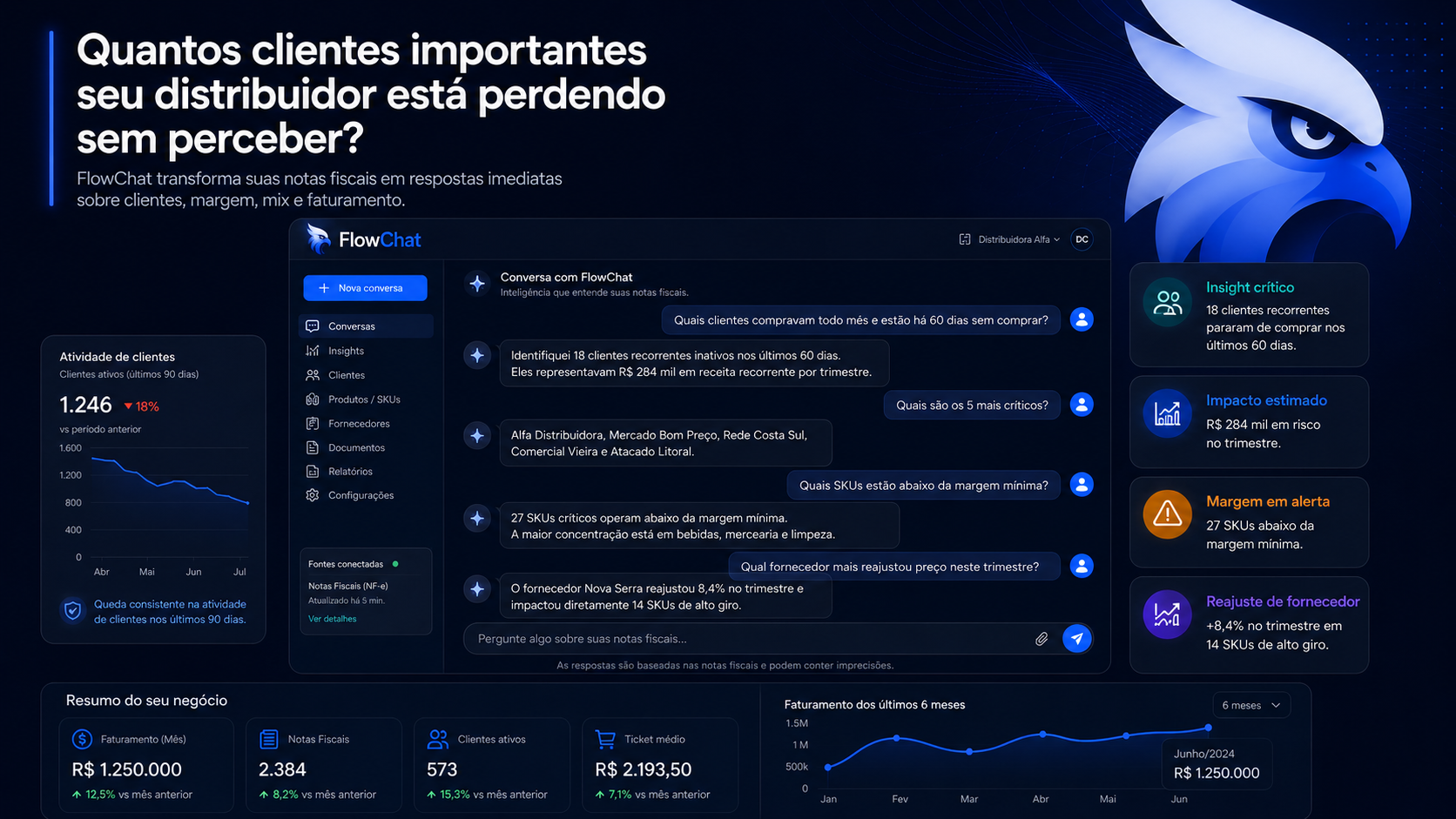
Illustrative example. Results vary according to the data analyzed.
Tax documents form the analytical foundation. ERP and other sources can expand context gradually—without replacing existing systems.
Find revenue at risk, strategic products, and operations that need attention.
Turn client documents into advisory analysis without multiplying the team's manual workload.
What you can discover
Results depend on the period, sources, and data quality. The scope starts with one clear question and an authorized sample.
Customers at risk
signals of reduced or interrupted purchasing
Strategic products
concentration, mix, and share of revenue
Sales and markets
trends by period, region, and customer profile
Tax operations
transactions and classifications that deserve review
See the agent in action
Your team asks in plain language. The agent calculates, explains, and keeps each answer connected to the documents behind the analysis.
Which products represent 80% of my revenue?
Tax Agent
ABC analysis shows which products concentrate revenue and how the rest of the catalog is distributed.
Which important customers have stopped buying?
Tax Agent
RFM segmentation identifies valuable customers whose purchase recency or frequency has declined and keeps the answer connected to source documents.
How much did we sell and what was the average ticket?
Tax Agent
The agent calculates sales and average ticket for the authorized period, with breakdowns by customer, product, and region.
Implementation starts small, with a relevant question and success criteria defined before expansion.
We define sources, priority questions, and the success metric.
We validate insights, alerts, and workflows with sample data or an authorized subset.
We expand connections, access, and automation as results validate the value.
Tax data requires trust
Validation respects the authorized scope and keeps conclusions connected to the sources that support them.
Explore Security and Compliance →Start only with the data required to validate the priority question.
Follow the documents and criteria used to build each answer.
Expand sources and automation only after value has been demonstrated.
The agent adds intelligence on top of the systems your company already uses.
Brazilian Tax Reform
A complementary offering to assess credits, pricing, margin, and the transactions most affected during the transition.
In the diagnostic, we define one priority question, the required sample, and the metric that will prove value before expanding scope.